minimal neovim 0.12 config
With nvim including their own package manager and new config features, I wanted to write a little bit about my new config to reference.
Here is my neovim config directory:
~/.config/nvim $ tree -L 2
.
├── init.lua
├── lsp
│   ├── basedpyright.lua
│   ├── bashls.lua
│   ├── css_variables.lua
│   ├── html.lua
│   ├── lua_ls.lua
│   ├── README.md
│   ├── rust_analyzer.lua
│   ├── sqruff.lua
│   ├── stylua.lua
│   ├── ts_ls.lua
│   └── yamlls.lua
├── lua
│   ├── autocmds.lua
│   ├── keymaps.lua
│   ├── lsp.lua
│   └── options.lua
├── nvim-pack-lock.json
└── plugin
    ├── barbar.lua
    ├── blink.lua
    ├── colorizer.lua
    ├── conform.lua
    ├── devicons.lua
    ├── fzf.lua
    ├── mason.lua
    ├── nvterm.lua
    ├── todo-comments.lua
    ├── tokyonight.lua
    └── vim-sleuth.lua
init.lua
My init.lua just requires the other lua files, in the /lua directory
require('options')
require('keymaps')
require('autocmds')
require('lsp')
plugins
Neovim 0.12 made it easy to use the built-in package manager pack.
Below is the lua config file for barbar. Dead simple config file.
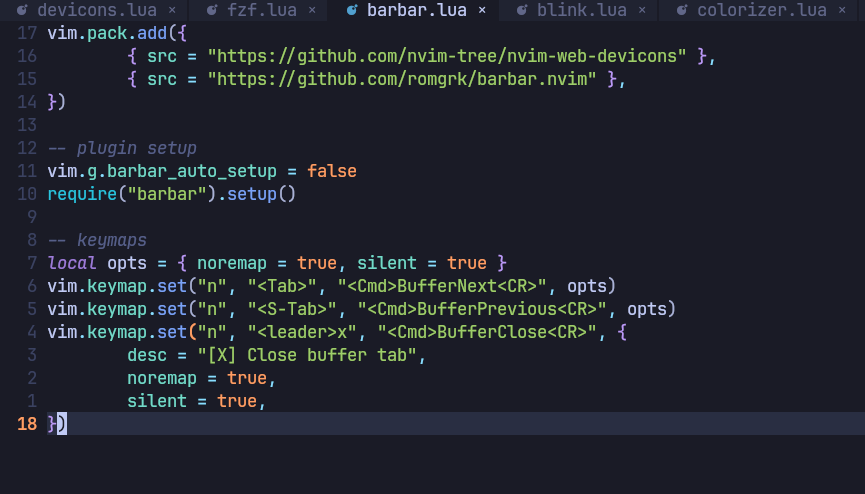
plugins that i use
- barbar - buffers as tabs
- blink.cmp - fuzzy find autocompletions
- colorizer - live preview of color codes typed
- conform - auto format code on save
- devicons - icons/glyphs for different filetypes (you can see the lua icon in the bar in the above screenshot)
- fzf - fuzzy finder for lua
- mason - package manager for lsp servers/formatter/linter
- nvterm - easy embedded terminal in neovim (i dont like tmux)
- todo-comments - highlights on comments that say
NOTEorFIXMEor whatever. just a quick visual way to see action area in a file - tokyonight - neovim colorscheme
- vim-sleuth - something to do with consistent tab/spaces ? might get rid of this one barely remember the reason
My mason config file:
vim.pack.add({
	{ src = "https://github.com/mason-org/mason.nvim" },
	{ src = "https://github.com/mason-org/mason-lspconfig.nvim" },
	{ src = "https://github.com/WhoIsSethDaniel/mason-tool-installer.nvim" },
})

-- mason core
require("mason").setup({
	ui = {
		icons = {
			package_installed = "✓",
			package_pending = "➜",
			package_uninstalled = "✗",
		},
	},
})

-- mason-lspconfig
require("mason-lspconfig").setup({
	ensure_installed = {
		"rust_analyzer",
		"html",
		"ts_ls",
		"yamlls",
		"lua_ls",
		"basedpyright",
		"bashls",
		"sqruff",
		"stylua",
		"css_variables",
	},
})

-- tool installer
require("mason-tool-installer").setup({
	ensure_installed = {
		"prettierd",
		"stylua",
		"shfmt",
		"ruff",
	},
})
You can install these LSP servers on your system yourself and add them to PATH, but for my use, it's easier to just install npm and pipx, then let mason-lspconfig install the LSP servers that I use.
lsp
To avoid using nvim-lspconfig and having 1 big file with every language server, you can configure lsp settings yourself and separate them into their own files in the /lsp directory.
Examples configs: https://github.com/neovim/nvim-lspconfig/blob/master/doc/configs.md
Here is my basedpyright config:
---@type vim.lsp.Config
return {
	cmd = { "basedpyright-langserver", "--stdio" },
	filetypes = { "python" },
	root_markers = {
		"pyrightconfig.json",
		"pyproject.toml",
		"setup.py",
		"setup.cfg",
		"requirements.txt",
		"Pipfile",
		".git",
	},
	settings = {
		basedpyright = {
			analysis = {
				inlayHints = {
					variableTypes = false,
					callArgumentNames = false,
					functionReturnTypes = false,
				},
				diagnosticMode = "openFilesOnly",
				autoSearchPaths = true,
				useLibraryCodeForTypes = false,
				typeCheckingMode = "standard",
			},
		},
	},
}